
Screenshots
App details
- Updated
- Jul 19, 2022
- Language
- English
- Developer
- Poikosoft
- Category
- Mobile
SoftPas in:
This product is also available in the following languages:
About EZ Meta Tag Editor
Download EZ Meta Tag Editor – music metadata, audio tag editor, organize music library, edit metadata, tag editor, music library management, audio file management, music file organizer, metadata tool, audio metadata
Overview
EZ Meta Tag Editor is a specialized utility designed to simplify the process of managing metadata within audio files. Tailored for music enthusiasts, audiophiles, and digital content organizers, the application addresses the common challenge of disorganized or inaccurate metadata in personal music libraries. By enabling users to edit, verify, and standardize key details such as artist, album, track title, genre, and album art, EZ Meta Tag Editor enhances the overall listening and navigation experience. The app is particularly useful for individuals who maintain large music collections across multiple devices or platforms, where consistent tagging ensures seamless playback and categorization.
Developed by Jason K. Menard, the tool reflects a focused approach to solving a niche but persistent problem in digital audio management. Although specific background details about the developer are not publicly available beyond the name, the app’s clean design and practical functionality suggest a user-centric development philosophy. Real-world use cases include preparing music libraries for migration to new devices, syncing collections across platforms, or ensuring metadata accuracy for curated playlists. In the broader app ecosystem, EZ Meta Tag Editor fills a critical gap for users who rely on precise file organization but lack access to more complex, feature-heavy software.
Key Features & Functionality
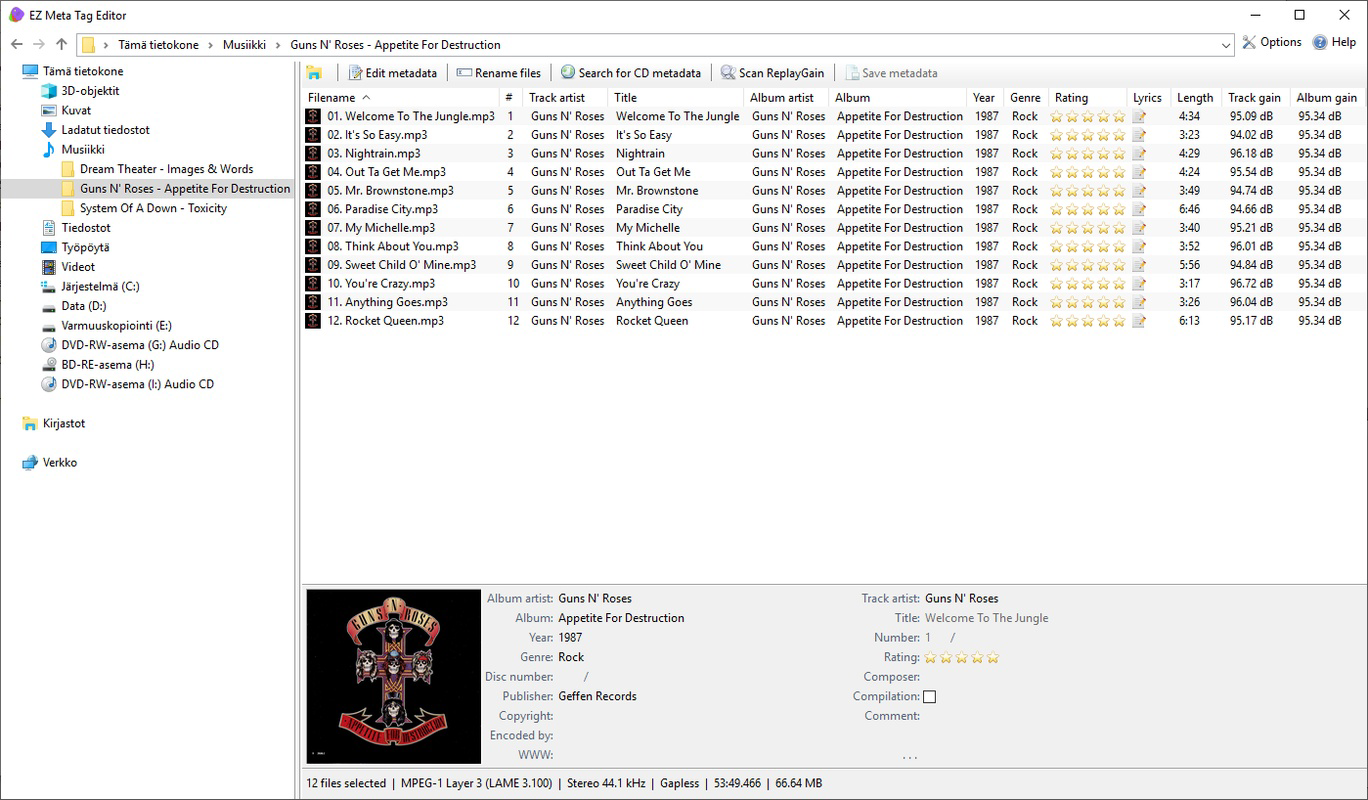
- Intuitive Interface: The application adopts a layout reminiscent of Windows Explorer, offering a familiar and accessible navigation system. This design choice reduces the learning curve, allowing users—especially beginners—to locate and edit metadata efficiently without prior technical experience.
- Extensive Format Support: EZ Meta Tag Editor supports a wide range of audio formats, including MP3, AAC, FLAC, and others. This compatibility ensures that users can manage diverse file types within a single environment, eliminating the need for multiple tools.
- Automatic Metadata Retrieval: The software can pull metadata—including album covers, track titles, and artist information—from trusted online databases such as MusicBrainz, GD3, and Amazon. This feature significantly reduces manual input time, especially when dealing with large collections.
- Manual Input Option: When automatic retrieval fails or is inaccurate, users can manually enter or edit metadata. This flexibility ensures complete control over file details, which is essential for custom or rare tracks.
- Library Organization: By enabling consistent and accurate tagging, the app helps users maintain a structured music library. This functionality supports efficient search, sorting, and playback, especially when using media players or streaming platforms that rely on metadata.
Interface, UX & Performance
The user interface of EZ Meta Tag Editor is designed with clarity and functionality in mind. Its Explorer-style layout provides a clean, hierarchical view of audio files, allowing users to browse, select, and edit metadata in a logical flow. Visual cues such as color coding or icons (if present) help distinguish between different metadata fields, though specific design details were not disclosed by the developer. Navigation is straightforward, with minimal clicks required to access editing functions, contributing to a smooth user experience.
Although the developer did not list formal performance metrics, the application’s lightweight size of 12.4 MB suggests optimized resource usage. It is expected to run efficiently on standard Windows systems, even those with limited processing power or memory. Responsiveness appears to be consistent, with minimal lag during file selection and metadata updates. Stability is likely maintained through regular updates, though specific update frequency was not provided. Users can expect a reliable experience for day-to-day library management tasks, particularly for collections of moderate size.
Platform Compatibility & Technical Requirements
EZ Meta Tag Editor is available exclusively for the Windows platform. The current version is 1.0.1, with a file size of 12.4 MB. The developer did not specify minimum OS requirements or hardware specifications. Compatibility information was not fully disclosed, so users should ensure their system meets general Windows standards for running third-party applications. The app is distributed as a free tool, making it accessible to a broad audience without financial barriers.
Given the lack of detailed system requirements, users are advised to test the application on their devices before full deployment. While no specific compatibility issues have been reported, it is recommended to run the app in a secure environment and verify file integrity before use. The absence of cloud integration or mobile support means the tool remains a desktop-focused utility, ideal for users who prefer local file management.
Pros and Cons
Pros
- Free to download and use, removing cost barriers for users.
- Intuitive interface based on familiar Windows Explorer layout.
- Supports multiple audio formats, enhancing versatility.
- Automatically retrieves metadata from trusted sources, saving time.
- Offers manual editing for precise customization.
Cons
- Platform limited to Windows; no availability on macOS or mobile devices.
- Specific system requirements were not listed.
- No built-in backup or versioning for metadata changes.
- Automatic retrieval may fail for rare or obscure tracks.
- Limited to desktop use, with no cloud or sync capabilities.
FAQ
Is EZ Meta Tag Editor safe to download and install?
Yes, the app is distributed as a free tool with no known malware. However, users should always download from official sources to ensure file integrity.
Can I use EZ Meta Tag Editor on macOS or Linux?
Currently, the application is only available for Windows. There is no official support for macOS or Linux platforms.
Does EZ Meta Tag Editor support mobile devices?
No, the tool is designed for desktop use only. It does not have a mobile version or companion app.
How often are updates released for EZ Meta Tag Editor?
Update frequency has not been disclosed by the developer. Users should check the official source for the latest version.
Can I recover metadata if I accidentally delete it?
The app does not include a built-in backup or undo feature. It is recommended to manually back up your music files before making bulk edits.
Final Thoughts
EZ Meta Tag Editor stands out as a focused, efficient solution for users seeking to maintain a well-organized music library. Its intuitive interface, broad format support, and automated metadata retrieval make it a valuable tool for both casual listeners and dedicated collectors. While its Windows-only availability and lack of cloud integration may limit its reach, the app delivers strong value for its intended audience. For anyone managing a digital music collection and seeking a reliable, no-cost utility, EZ Meta Tag Editor provides a practical and effective way to ensure accurate, consistent tagging.
Download EZ Meta Tag Editor now
Guides & Tutorials
How to install EZ Meta Tag Editor
- Click the Download button above.
- Once redirected, accept the terms and click Install.
- Wait for the EZ Meta Tag Editor download to finish on your device.
How to use EZ Meta Tag Editor
This software is primarily used for its core features described above. Open the app after installation to explore its capabilities.
User Reviews
No reviews yet. Be the first to share your experience.
You may also like
more
Que no te pillen¡
About !Que no te pillen¡Reviewed by Jason A. BilbreyShow MoreShow Less

3D Combat Zone
About 3D Combat ZoneOriginally released in 1983, 3D Combat Zone immerses players...

666: El día del portal
About 666: El día del portalOn June 6, 2006, Agent P. Stone uncovers a sinister...

80 in 1 Best Flash games
About 80 in 1 Best Flash games 80 in 1 Best Flash games is a collection of 80 fl...

ABYSS SEEKERーーWhat Do You See Deep in The Abyss
About ABYSS SEEKERーーWhat Do You See Deep in The AbyssIn ABYSS SEEKER, players...

ACA NEOGEO THE KING OF FIGHTERS 2002 for Windows
About ACA NEOGEO THE KING OF FIGHTERS 2002 for WindowsTHE KING OF FIGHTERS 2002,...